Upcoming events grid
[spacer height="-45px" id="2"]Le ProActif - Septembre 2019
Le ProActif - Juin 2019
Le ProActif - Mars 2019
- Administrateur
- Éditeur
- Auteur
- Contributeur
- Abonné/suivre
- Contributeur d’évènements
Les différents rôles dans WordPress : Super administrateur, Administrateur, Editeur, Auteur, Contributeur, Abonné
On nous pose souvent la question de la différence entre les divers rôles disponibles dans WordPress. Vous pouvez avoir toutes ces informations dans la base de connaissance de WordPress. Le blog Ruche que je cite ici à fait une traduction bien utile:
Droits du super administrateur : Gestion du réseau Gestion des sites Gestion des utilisateurs du réseau Gestion des thèmes du réseau Gestion des options du réseau HTML non filtré lors de l’utilisation Multisite
Droits de l’administrateur :
Mise à jour de du coeur de WordPress Changement de thèmes Édition de thèmes Activation de plugins Édition de plugins Gestion des utilisateurs Édition de fichier Gestion des options Modération des commentaires Export Gestion des catégories Gestion des liens Gestion du tableau de bord Upload de fichiers Importations Utilisation de code HTML et Javascript Edition d’articles Edition des articles des autres utilisateurs Edition d’articles publiés Publication d’articles Edition de pages LectureDroits de l’éditeur :
Modération des commentaires Gestion des catégories Gestion des liens Upload de fichiers Utilisation de code HTML et Javascript Edition d’articles Edition des articles des autres utilisateurs Edition d’articles publiés Publication d’articles Edition de pages LectureDroits de l’auteur :
Upload de fichiers Edition d’articles Suppression d’articles Publication d’articles LectureDroits du contributeur :
Edition d’articles LectureDroits de l’abonné :
Lecture[su_button url="https://peubanks.blog/wp-content/uploads/2019/08/pdf_2019-08-17_03-04-26_2.pdf" center="No" desc="Support"]Shortcodes 2[/su_button]
[su_button url="https://peubanks.blog/wp-content/uploads/2019/08/pdf_2019-08-17_03-04-26_1.pdf" center="No" desc="Shortcode support"]Shortcodes 1[/su_button]
- Page/articles

- Site complet

[metaslider id="2301"]
[metaslider id="2315"]
[metaslider id="2324"]
[metaslider id=2590]
[super_hero_slider slider=5238]
M.E. Calendar
If you are running an event website or you want to provide a website with booking services on WordPress, you will need a strong and practical plugin for it which can provide you all possible features. MEC is easy to use a plugin that you can add and publish your events easily to your WordPress website and also, organize and categories them in the best way. Also, you can sync it with lots of other features to have the best outcome.
Modern Events Calendar has been created according to trending design methods and latest technology with attractive design based on practical concept of design.
We gathered all features of event calendar as you desire with advanced booking system (Pro Version) and many other useful options which are practical in real world!
Using Modern Events Calendar Lite, you can create different single or recurring events and show them in frontend of your website using many modern skins and styles.
Convert your events in a few seconds
If you are using event-on plugin or the event calendar and you are willing to migrate to WordPress Event Calendar’s best plugin then no need to worry about transferring your current content.
Only by a few clicks in a couple of seconds your current content eventswill be imported automatically with full details.
Addons
We have begun to create practical add-ons. Now, you will have access to a wide range of features using them. Please have a look at these add-ons: (MEC Pro requeired)
– Woocommerce Integration – Documentation
– Elementor Shortcode Builder – Documentation
– Elementor Form Builder – Documentation
– Elementor Single Builder – Documentation
Helpful Documentation
WordPress Event Calendar’s best plugin documentation is useful without overstatement for Modern Event Calendar. It starts with simple steps for easy configuration and covers all essential aspects from beginning to the most advanced parts with step by step configuration of the plugin.
You can see plugin demo here
You can see plugin documentation here
Main Features
- Import from « The Event Calendar » Plugin
- Import from « EventOn » Plugin
- Import from « Events Schedule WP » Plugin
- Import from « Calendarize It » Plugin
- Internal XML import and export
- Single day events
- Multiple day events
- All day events
- Full Calendar view
- Monthly calendar view (3 Skins)
- Daily view
- Weekly view
- Countdown view (3 Skins)
- Grid & cover view (10 Skins)
- Slider & carousel view (8 Skins)
- List View (5 Skins)
- Event locations system
- Event Venue & organizer system
- Multiple organizers
- Front-end Event Submission
- Never end events
- Event widgets & sidebar
- Custom sidebar
- QRcode module
- Recurring/Repeating events
- Shortcodes generator
- Direct/Modal link for single event
- Show/Hide option for search bar
- Filtering options
- Google calendar integration
- Reporting dashboard
- Local time
- Manage Notifictions
- Reminders notification
- RSS feed
- Schedule for single event
- Download .ics file
- Social share icons
- Custom Color
- Feed support for MEC categories
- Expired Events filter in shortcodes
- Duplicate event feature
- Advanced currency options
- Support comment form in single event page
- Insert images for locations and organizers
- Event countdown
- Dynamic event labels
Integration
- WPML ready
- WordPress Multisite ready
- Visual Composer addon
- Cache plugins compatibility
- SEO plugins compatibility
Developers
- Completely developer friendly
- Ability to override archive and single pages in a theme
- Ability to override skin files in a theme
- Ability to filter plugin options using WordPress filtering system
- Ability to fire custom functions using WordPress actions API
Bold Features
- Mailchimp Integration
- BuddyPress Integration
- Archive Page Skin
- Single and Multiple day events
- Advanced Google Maps
- Import events from Google Calendar
- Export filtered events into CSV, MS Excel, JSON and XML formats
- Exceptional Days
- Google Recaptcha
- Event countdown
- Hourly Schedule
- Import from third party plugins
- Available Widget in all Sidebar
- Matching Shortcode and Widget
- Matching Shortcode and Visual Composer
- Custom CSS
- Currency options
- Advanced categorizing and filtering options
- Event note for frontend event submission
- Frontend Event Submission
- Notifications
- Recurring/Repeating events
- Next Event Module
- Shortcode Creator
- Multiple color skins
- Slider View
- Cover View
- Countdown View
- Carousel View
- Monthly/Calendar View
- Weekly View
- Daily View
- List/Grid View
- RTL support
- Multiple organizers
- event submission by guest (Not logged-in) users
- Event Details/Single Event Page
- Multisite Ready
- WPML Ready
- SEO ready
- Developer friendly
- Choose Weekends
- Eruop language completed
- Map View (pro)
- Available spot (pro)
- Timetable view (pro)
- Masonry view (pro)
- Agenda view (pro)
- Map view + Directions (pro)
- Import .ics file (pro)
- Reminders notification (pro)
- Booking (pro)
- Booking reminder notification (pro)
- Individual booking form per event (pro)
- Advanced Tax/Fee system (pro)
- Multiple Tickets system (pro)
- Coupons/Discount system (pro)
- PayPal Integration (pro)
- Booking form builder (pro)
- Auto verification (pro)
- WooCommerce Payment Integreation (pro)
- Stripe Payment Integreation (pro)
- Auto Update (pro)
- Weather module (pro)
- PDF invoice (pro)
- Implemented 3 payment methods (pro)
- CSV export option for bookings (pro)
- MS Excel export option for bookings (pro)
- Create various kind of tickets (pro)
- Set a limit on total bookings (pro)
- Set a limit for certain tickets (pro)
TablePress allows you to easily create and manage beautiful tables. You can embed the tables into posts, pages, or text widgets with a simple Shortcode. Table data can be edited in a spreadsheet-like interface, so no coding is necessary. Tables can contain any type of data, even formulas that will be evaluated. An additional JavaScript library adds features like sorting, pagination, filtering, and more for site visitors. Tables can be imported and exported from/to Excel, CSV, HTML, and JSON files.
More information
Please visit the plugin website at https://tablepress.org/ for more information or a demo).
Supporting future development
If you like TablePress, please rate and review it here in the WordPress Plugin Directory or support it with your donation. Thank you!
TablePress Extensions
Additional features and useful enhancements are available as separate plugins, called TablePress Extensions, on the plugin website.
Usage
After installing the plugin, you can create and manage tables on the « TablePress » screen in the WordPress Dashboard.
Everything should be self-explaining there.
To show one of your tables in a post, on a page, or in a text widget, just embed the Shortcode [table id=<the-ID> /] into the post/page/text widget, where <the-ID> is the ID of your table (can be found on the left side of the « All Tables » screen.)
Alternatively, you can also insert tables by clicking the « Table » button in the editor toolbar, and then selecting the desired table.
After that, you might want to change the styling of the table. You can do this by entering CSS commands into the « Custom CSS » textarea on the « Plugin Options » screen. Some examples for common styling changes can be found on the TablePress FAQ page.
You may also add certain features (like sorting, pagination, filtering, alternating row colors, row highlighting, print name and/or description, …) by enabling the corresponding checkboxes on a table’s « Edit » screen.
Acknowledgements
Special thanks go to Allan Jardine for the DataTables JavaScript library.
Thanks to all language file translators!
Thanks to every donor, supporter, and bug reporter!
License
This plugin is Free Software, released and licensed under the GPL, version 2 (https://www.gnu.org/licenses/gpl-2.0.html).
You may use it free of charge for any purpose.
[su_button url="https://peubanks.blog/musique/partitions-et-fichiers/" background="#418c0a" wide="yes" text_shadow="10px 10px 5px #000000" desc="Création de tables"]Échantillon[/su_button]
Simple upload of interactive puzzles exported by Crossword Compiler, or conversion of puzzles already posted to the
http://crossword.info website.
[su_button url="https://peubanks.blog/category/loisirs/" target="blank" background="#871f4e" size="4" wide="yes" text_shadow="10px 10px 5px #000000" desc="Création de mots croisés "]Échantillon[/su_button]
The Fastest and Most Powerful WordPress Sidebar Plugin yet. Create tailored widget areas for any post, page, or custom post type in seconds. No coding required!
You can optimize conversion rates, boost on-site SEO, upsell products, and much more by displaying different widget areas on different conditions.
If your site or web app is big or in growth, Content Aware Sidebars is the ideal solution for you.
Add Unlimited Sidebars & Widget Areas
Replace your theme sidebars on different conditions, or insert sidebars with shortcodes. With the All-in-one Sidebar Manager, you can easily activate and deactivate widget areas, and you can even schedule them for specific times.
Sidebars – Quick Select© lets you add or select widget areas directly when editing a post or page.
Show or Hide Widgets on Any Page (Yes, any)
Create a post sidebar, a page sidebar, a category sidebar, or any custom sidebar you need, without confusing widget logic code. You can even combine conditions in any way you like, so you can display widgets and custom sidebars on all posts in a select category and written by a specific author.
Display your widget areas on any of these conditions:
- Posts, Pages & Custom Post Types
- Content with Tags, Categories, or Custom Taxonomies
- Content written by select Authors
- Page Templates
- Blog Page & Post Type Archives
- Author Archives
- Taxonomy Archives
- Date Archives
- Front Page, Search Results, 404 Not Found Page
- bbPress Profiles, Forums & Topics
- BuddyPress Profile Sections
- Languages (WPML, Polylang, qTranslate X, Transposh)
- Pods Pages
- Any Combination of Above
Customize Your Widget Areas Your Way
Without writing any code, you can modify the HTML and CSS classes of widget areas, widgets, and widget titles. You get full control over the look and feel of your sidebars and widget areas, no matter what theme you use.
Sidebar Visibility lets you elegantly hide any widget area for logged-out users.
The Most User-friendly Widget Manager
If you have more than just a few widgets and widget areas, you will love the Enhanced Widget Manager. When adding new widgets to sidebars, Live Search will find widgets in seconds, and the smart split-screen gives you a much better overview of your widget options.
1-Click Sidebar Activation© lets you activate or deactivate widget areas instantly.
Sidebar Plugin Integrations & Support
Content Aware Sidebars automatically supports Custom Post Types and Taxonomies created by any plugin or theme. Built-in support for some of the most popular WordPress plugins means that you e.g. can create WooCommerce sidebars for select products or BuddyPress sidebars for your members.
- bbPress
- BuddyPress
- Easy Digital Downloads
- qTranslate X
- Pods
- Polylang
- Transposh Translation Filter
- WooCommerce
- WPML
Content Aware Sidebars Pro – Complete control for your widget areas
Highlighted Premium Features
- Widget Area Designer: Add widget columns and edit colors, backgrounds, paddings, etc.
- Widget Areas in Theme Hooks: Intelligently insert new widget areas into your theme without coding
- Automatic Widgets Backup: Easily restore any changed or deleted widgets
- Widget Cleaner: Save memory and remove clutter by disabling and removing unused widgets
- Extended User Visibility: Show or hide widget areas User Roles, BuddyPress Groups, and more
- Time & Weekday Schedule: Display widget areas only in select time ranges on given days
- Container Widget: Turn widget areas into reusable blocks and show the same widgets in different places
- Duplicate Widget Areas: A real time-saver when adding new similar widget areas
- First-class Email Support: Get expert help fast and directly to your inbox
- and so much more…
Even More Sidebar Conditions
Display your widget areas on these additional conditions:
- URLs + wildcards
- Content from any day, month, year
- BuddyPress Groups
Upgrade at anytime instantly and securely from the Admin Dashboard, or click here to upgrade now!
More Information
WordPress Contact Form Builder Plugin
We believe that you shouldn’t have to hire a developer to create a WordPress contact form. That’s why we built WPForms, a drag & drop WordPress form builder that’s EASY and POWERFUL.
WPForms allows you to create beautiful contact forms, feedback form, subscription forms, payment forms, and other type of forms for your site in minutes, not hours!
At WPForms, user experience is our #1 priority. Our pre-built form templates and workflows make WPForms the most beginner friendly contact form plugin in the market.
WPForms is a 100% mobile responsive contact form solution, so your contact forms will always look great on all devices (mobile, tablet, laptop, and desktop).
WPForms’ contact forms are also highly optimized for web and server performance because we understand the importance of speed when it comes to SEO, marketing, and conversion. We can honestly say that WPForms is one of the fastest WordPress contact form builder plugins in the world.
WPForms Pro
This plugin is the lite version of the WPForms Pro plugin that comes with all the contact form features you will ever need including email subscription forms, multi-page contact forms, file uploads, conditional logic, payment integrations, form templates, and tons more. Click here to purchase the best premium WordPress contact form plugin now!
We took the pain out of creating contact forms and made it easy. Here’s why smart business owners, designers, and developers love WPForms, and you will too!
Drag & Drop Contact Form Builder
We were tired of the bloated and buggy contact form builder plugins. That’s why we built WPForms to adapt to your workflow and allow you to create custom contact forms in minutes. By using our easy to use drag and drop online form builder, you can easily add custom form fields, rearrange them, and basically create a complete contact form in 5 minutes or less.
But don’t just take our word. See what one of the WordPress experts are saying:
WPForms is by far the easiest form plugin to use. My clients love WPForms and it’s one of the few plugins they can use without any training. As a developer I appreciate how fast, modern, clean and extensible it is.
Bill Erickson – Expert WordPress Consultant
Pre-built Form Templates
Building contact forms in WordPress can be time consuming. Why?
Because every other WordPress contact form builder plugin requires you to build your contact form from scratch. The truth is it’s often not necessary to create a contact form completely from scratch unless you really want to.
Whether you’re looking to create a simple contact form, marketing form, request a quote form, donation form, payment order form, registration form, or a subscription form, we have a form template for you inside our contact form builder.
WPForms comes with pre-built form templates to help you save time. You can add, remove, or re-arrange fields as necessary.
See 150+ Pre-Made WPForms Form Template Demo
Mobile Ready, SEO Friendly and Optimized for Speed
WPForms’ contact forms are 100% responsive and mobile-friendly by default. We also optimized every query on the front-end and the back-end to ensure maximum speed – Yes, WPForms is one of the fastest WordPress contact form plugin.
You can embed your contact form on any page with optimized title and description. With the speed and proper formatting, WPForms is also one of the most SEO friendly contact form plugin.
All the Fields & Features that You Need to Succeed
From star ratings to file uploads to multi-page contact forms with progress bar, we have all the fields you need.
You can easily integrate your contact forms with an email marketing service or collect payments for bookings and orders. WPForms allows you to do it all.
The best part is, you can do it all without hiring a developer.
See what one business owner has to say about WPForms’ contact form:
As a business owner, time is my most valuable asset. WPForms allow me to create smart contact forms with just a few clicks. With their pre-built form templates and the drag & drop builder, I can create a new form that works in less than 2 minutes without writing a single line of code. Well worth the investment.
David Henzel – Co-founder of MaxCDN
Surveys & Polls
Along with contact form, you can also use WPForms to create surveys and polls.
Our WordPress Survey plugin addon comes with smart survey fields including likert scale, star ratings, multiple choice, Net Promoter Score (NPS), and more.
WPForms offer the best-in class survey reporting. You can use our interactive reports to customize the graphs, export them for your presentations, and even display the aggregate results to your users.
The best part about WPForms survey reports is that it can retroactively work on any old contact form created with WPForms.
You can also use the surveys & polls addon to easily create a poll on your site. Our poll feature offers real-time reports, so you can share poll results with the user immediately after they submit their vote.
Just like the contact form, you can embed your surveys and polls inside any post, page, or widget area in WordPress.
Payment Form, Donation Form, Booking Form, and More
While WPForms started out as a contact form plugin, it has evolved into a powerful forms solution that you can use to create a payment form, donation form, registration form, online booking form, and more.
WPForms integrates with both PayPal and Stripe to make it easy for you to accept credit card payments online. It even comes with a signature field to collect user signature on your WordPress forms.
You can do all of this while still using the same easy-to-use contact form builder that’s loved by over 1 million users.
I am so impressed with this plugin. I decided to give it a shot over some of the other form plugins, and I am so glad I did. It works well, is so easy to use and customize. The support is amazing on top of it all. I got the pro version because I was so pleased. Highly recommend.
Micky73 – WordPress user
Easy to Customize and Extend
You can easily customize your contact forms with our section dividers, HTML blocks, an custom CSS.
We also knew that our developer friends may want to extend contact forms further. That’s why WPForms come with tons of hooks and filters to create custom functionality.
Since contact forms are essential for marketing, WPForms is a must have plugin for every website!
Full WPForms Feature List
- Online Form Builder – Our powerful drag & drop contact form builder allows you to easily create WordPress contact forms and other online forms in just a few minutes without writing any code.
- 100% Responsive – Mobile Friendly contact forms.
- GDPR Friendly – Make your contact form GDPR compatible with just a few clicks.
- Form Templates – Use our pre-built form templates to save time. Never start from scratch again (see all form templates demos).
- Spam Protection – WPForms utilizes smart CAPTCHA and Honeypot method to stop spam contact form submissions.
- Instant Form Notification – Quickly respond to incoming inquiries with our instant contact form notification system.
- Smart Form Confirmation – Show a custom success message, or redirect users to a custom thank you page.
- File Uploads – Collect files and media through your contact forms with File Uploads.
- Multi-Page Forms – Split long forms into multiple pages with progress bar to improve user experience.
- Smart Conditional Logic – Show or hide fields and contact form sections based on user behavior.
- Signature Forms – Create signature forms or add the signature field to your contact form, application form, booking form, etc.
- User Registration Forms – Create custom user registration form and custom login form in WordPress.
- Post Submissions – Collect user-submitted content in WordPress with our front-end post submission form. Great for guest posts, testimonials, business directory, listings, etc.
- Geolocation – Display location information about your users.
- Custom Captchas – Create custom captchas for your contact form.
- Surveys and Polls – Easily create surveys forms and analyze the data with interactive reports.
- Form Abandonment – Unlock more leads and grow your business with partial-form submission.
- Form Locker – Manage form permissions and add access control rules including password-protected forms, members only forms, limit contact form entry per person, close form after specific date / time, etc.
- Offline Forms – Let your visitors save their entered data offline and submit when their internet connection is restored.
- Form Landing Pages – Create « distraction-free » form landing pages to boost conversions. Great Google Forms and Wufoo alternative.
- Conversational Forms – Interactive form layout that makes your form feels more human and boost overall completion rate. Great for surveys and registration forms. Perfect Typeform alternative for WordPress without the high costs.
Integrations
- PayPal Payment Forms – Create PayPal forms to easily collect payments, donations, and online orders.
- Stripe Forms – Easily collect credit card payments, donations, and online orders with our Stripe addon.
- MailChimp Forms – Create MailChimp newsletter signup forms in WordPress and connect with your contact form to grow your email list.
- AWeber Forms – Create AWeber newsletter signup forms in WordPress and connect with your contact form to grow your email list.
- Campaign Monitor Forms – Create Campaign Monitor newsletter signup forms in WordPress and connect with your contact form to grow your email list.
- GetResponse Forms – Create GetResponse newsletter signup forms in WordPress and connect with your contact form to grow your email list.
- Constant Contact Forms – Create Constant Contact newsletter signup forms in WordPress and connect with your contact form to grow your email list.
- Drip Forms – Create Drip newsletter signup forms in WordPress and connect with your contact form to grow your email list.
- Zapier Addon – Connect your WordPress forms with over 1000+ apps. Route your contact form data to your favorite CRM, email marketing service, etc.
After reading this feature list, you can probably imagine why WPForms is the best WordPress contact form plugin in the market.
Give WPForms a try.
Want to unlock more features? Upgrade to our Pro version.
Crédits
This plugin is created by Jared Atchison and Syed Balkhi.
Branding Guideline
WPForms® is a registered trademark of WPForms LLC. When writing about the contact form plugin by WPForms, please make sure to uppercase the initial 3 letters.
- WPForms (correct)
- WP Forms (incorrect)
- wpforms (incorrect)
- wpform (incorrect)
What’s Next
If you like this plugin, then consider checking out our other projects:
- OptinMonster – Get More Email Subscribers with the most popular conversion optimization plugin for WordPress.
- MonsterInsights – See the Stats that Matter and Grow Your Business with Confidence. Best Google Analytics Plugin for WordPress.
- SeedProd – Jumpstart your website with the #1 Coming Soon & Maintenance Mode Plugin for WordPress.
- WP Mail SMTP – Improve email deliverability for your contact form with the most popular SMTP plugin for WordPress.
Visit WPBeginner to learn from our WordPress Tutorials and find out about other best WordPress plugins.
Remarque
WPForms is absolutely, positively the most beginner friendly WordPress contact form plugin on the market. It is both easy and powerful.
We took the pain out of creating online forms and made it easy. Check out all WPForms features.
Also, I’m the founder of WPBeginner, the largest WordPress resource site for beginners. It was a huge priority for me to make a WordPress contact form plugin that beginners can use without any training.
I feel that we have done that here. I hope you enjoy using WPForms.
Thank you
Syed Balkhi
Shortcodes Ultimate is a comprehensive collection of various visual and functional elements, which you can use in the post editor, text widgets or even in template files. Using Shortcodes Ultimate you can easily create tabs, buttons, boxes, sliders and carousels, responsive videos and much, much more.
Features
- 50+ beautiful shortcodes
- 1-click shortcode insertion with live preview
- Gutenberg-ready
- Works with any theme
- Modern responsive design
- Documentation
- Custom CSS editor
- Custom widget
- Translation-ready
- RTL support
- Developer-friendly
Links
Check out premium add-ons!
- Extra Shortcodes – 15+ additional shortcodes
- Additional Skins – 60+ additional skins
- Shortcode Creator – create your own custom shortcodes
- Add-ons Bundle – All-in-one!
Available Shortcodes
Heading       Tabs          Spoiler     Accordion
Divider       Spacer        Highlight   Label
Quote         Pullquote     Dropcap     Columns
List          Button        Service     Box
Note          Expand        Lightbox    Tooltip
Private       YouTube       Vimeo       Dailymotion
Audio         Video         Table       Permalink
Members       Guests        RSS         Menu
Sub pages     Siblings      Document    Google map
Slider        Carousel      Gallery     Posts
Dummy text    Dummy image   Animation   Meta data
User data     Post data     Template    QR code
Scheduler
Thanks to these great guys for contribution
- Reviews by advanced users
- Dmitry Semenov – Magnific Popup jQuery plugin
- Craig Thompson – qTip jQuery plugin
- Vladimir Kharlampidi – Swiper jQuery plugin
- Fork Awesome & Dave Gandy
- James Smith – Simple Slider jQuery plugin
- pt_br locale: Ibidem Translations
- fr_fr locale: Nicolas Leclerc
- el_gr locale: Kleanthis Manolopoulos
- sk_sk locale: Patrik Žec (PATWIST)
- cs_cz locale: Punc00
- sv_se locale: Javier Marcilla
[passster headline="Zone réservée aux membres" password="LIV_lindeland_2018_ronald"][su_menu name="Essais 3"][/passster]
W3 Total Cache and WP Super Cache are great caching plugins, but they do not know when a widget is updated. WPEngine is the best place to host your WordPress installation, but their caching system is no smarter when it comes to updating widgets and menus. I created this plugin because my website did not see any changes when saving widgets or menus using these caching systems. Clear Cache For Me will purge ALL your cache each time you do a save without having to press an additional button. It may be overkill, which may be why it’s not built in, but some people need simplicity.
In addition to clearing those pesky caching engines, Clear Cache for Me can force your browser to reload your current theme’s CSS and JS files. I modify my theme’s CSS and JS files every so often and always have trouble with the browser not getting the latest version. So now after clicking on the « Clear Cache Now! » button on the dashboard the browser will be forced to reload the current theme’s CSS and JS files. If you do not click the « Clear Cache Now! » button, the browser will cache the CSS and JS files like it normally does.
The popular Qode themes has a options to set your own custom CSS and JS. Sometimes you may not see your changes for a long while because your browser is trying to get the cached file. Whenever you save your Qode’s options, the CSS and JS files will be forced to reload in the browser on the public side.
Works with the following caching systems:
- W3 Total Cache
- WP Super Cache
- WP Fastest Cache
- WPEngine hosting
Clears all cache for following actions:
- When Widgets are saved
- When Customizer is saved
- When Menus are saved
- When Settings from a settings page is saved.
- When a Contact Form 7 form is saved.
- When WooThemes settings are saved.
- When NextGen Gallery albums and galleries are updated (beta – may not clear cache on all actions).
- When Qode options are saved this plugin forces browsers to reload the custom css and custom js.
There is a convenient clear cache button on the dashboard for users with the right capability. Admins (users with the ‘manage_options’ capability) can set which capability a user needs to view the button. If you are using this button often, please consider submitting a request to have this plugin do your button-pushing for you. This plugin is meant to work behind the scenes to make your life easier and less frustrating.
Developer Options
ccfm_supported_caching_exists
Use this filter to determine if this plugin should do anything including showing the button on the dashboard. Return true if a caching system is supported.
Default: True if any of the supported caching systems is active.
See Example 1 below.
ccfm_admin_init
Use this action to add hooks when cache is to be cleared. Or do any other setup activity.
ccfm_clear_cache_for_me_before
Use this action to clear cache from an unsupported caching system before the default caching systems clear their cache.
ccfm_clear_cache_for_me
Use this action to clear cache from an unsupported caching system after the default caching systems clear their cache.
Example 1
Thanks to Benjamin Pick – If you are using Autoptimize and need to clear the CSS or JS files automatically, you can add the code below to your theme’s functions.php file. This code also demonstrates how you can add an unsupported caching system and have its cache cleared for you.
https://gist.github.com/benjaminpick/94b487ce995454797143
also pasted below:
<?php
function yt_cache_enable($return) {
if (class_exists(‘autoptimizeCache’))
return true;
    return $return;
}
add_filter('ccfm_supported_caching_exists', 'yt_cache_enable');

function yt_cache_clear() {
    if (class_exists('autoptimizeCache'))
        autoptimizeCache::clearall();
}
add_action('ccfm_clear_cache_for_me', 'yt_cache_clear');
Example 2
Thanks to Benjamin Pick – If you have an automatic deployment setup and need a webhook to clear the caches, you can add this code to your theme’s functions.php file.
https://gist.github.com/benjaminpick/67b6b9a49ef7991172f9
also pasted below:
<?php
if (!defined(‘CLEAR_CACHE_HOOK_KEY’))
define(‘CLEAR_CACHE_HOOK_KEY’, ‘some_secret_key_please’);
function yt_cache_clear_web_hook() {
    if (isset($_GET['key']) && $_GET['key'] == CLEAR_CACHE_HOOK_KEY) {
        if (function_exists('ccfm_clear_cache_for_me')) {
            ccfm_clear_cache_for_me( 'ajax' );
            echo 'Cache was cleared.';
        } else {
            echo 'Install the plugin "Clear Cache For Me" first';
        }
        exit;
    }
}

// Call this URL to clear the cache:
// /wp-admin/admin-ajax.php?action=clear_cache&key=some_secret_key_please

add_action( 'wp_ajax_clear_cache', 'yt_cache_clear_web_hook' );
add_action( 'wp_ajax_nopriv_clear_cache', 'yt_cache_clear_web_hook' );
Display Posts allows you easily list content from all across your website. Start by adding this shortcode in the content editor to display a list of your most recent posts:
- Around the blocks
- Calendrier des événements
- Votre webcam ou l’audio ne fonctionnent pas
- Mot de la presidence
- Comité de développement en région (Test 2)
- Comité de développement en région
- Testimonials
- Rappel — Prix reconnaissance 2020
- MailPoet
- BOOMER STRINGS: A report confirms that today’s parents are in ever more frequent contact with their children at college.
- 30 phrases que vous ne pensiez pas si blessantes
- Je suis un aîné
Filter by Category
To only show posts within a certain category, use the category parameter:
Display as Post Grid
You can create a great looking, column-based grid of posts with a bit of styling. Here’s how!
List Popular Posts
You can highlight your popular content in multiple ways. If you want to feature the posts with the most comments, use:
You can also list most popular posts by social shares.
Include thumbnails, excerpts, and more
The display parameters let you control what information is displayed for each post. To include an image and summary, use:
- Around the blocks - Hurricane (Her-ricane), the spirit of the African woman who has been stolen, beaten, raped, murdered, and thrown overboard the slave ships en route to enslaved lands. This is why all hurricanes start at the same point of exodus of Africa, the post of the Atlantic Slave Trade, and hit every stop where slaves were sold.… Read More
- Calendrier des événements
- Votre webcam ou l’audio ne fonctionnent pas - (TRADUCTION GOOGLE d’un document de Edgar Cervantes / Autorité Android) Avez-vous joint une réunion et vous n’entendez personne? Si c’est le cas, vous avez probablement fermé la boîte de dialogue d’ouverture avant de vous connecter à une réunion. C’est un des problèmes de zoom les plus courants. Au lieu de le fermer, assurez-vous d’appuyer plutôt… Read More
- Mot de la presidence - PAR PIERRE EUBANKS PRESIDENT PAR INTERIM DU CONSEIL D’ADMINISTRATION DU CONSEIL REGIONAL DE QUEBEC—PRESIDENCE.QUEBEC@APRQ.CA[spacer height=”12px” id=”3″]Bonjour à tous et toutes[spacer height=”16px” id=”5″]Si je vous demandais quels sont les mots qui ont attiré votre attention au cours des derniers mois, voire la dernière année, vous diriez fort probablement : Pandémie, Covid-19, confinementå, couvre-feu, masques, et vaccins.… Read More
- Comité de développement en région (Test 2) - Rencontre du 8 ‘ décembre 2020 à 10h00 en conférence avec Zoomdurée prévue 1h00https://zoom.us/j/4922543293?pwd=cHFvb1NUaEtNTUt3MmR3RHlvQXNsZz09ID de réunion : 492 254 3293 et Code secret : 2L0NSPPar téléphone au 1 438 809 7799 Canada avec ID de réunion : 492 254 3293 et Code secret : 076321 Projet d’ordre du jour :Ouverture (5 minutes)1. Adoption de l’ordre… Read More
- Comité de développement en région - Comité de développement en région Rencontre du 8 décembre 2020 à 10h00 en conférence avec Zoom[spacer height=”10px” id=”2″] durée prévue 1h00[spacer height=”10px” id=”2″] https://zoom.us/j/4922543293?pwd=cHFvb1NUaEtNTUt3MmR3RHlvQXNsZz09[spacer height=”10px” id=”2″] ID de réunion : 492 254 3293 et Code secret : 2L0NSP[spacer height=”10px” id=”2″] Par téléphone au 1 438 809 7799 Canada avec ID de réunion : 492 254… Read More
- Testimonials
- Rappel — Prix reconnaissance 2020 - Ceci est un document <a target=”_blank” href=”https://office.com” rel=”noopener noreferrer”>Microsoft Office</a> incorporé, avec <a target=”_blank” href=”https://office.com/webapps” rel=”noopener noreferrer”>Office</a>.
- MailPoet -  Hello , Nous sommes heureux d’annoncer aujourd’hui la version bêta de QSM 7.0, qui inclut une refonte complète de l’administration par rapport à la version précédente et plusieurs autres améliorations. Si vous souhaitez tester cette version bêta, procédez comme suit. Remarque: comme il s’agit d’une version bêta, assurez-vous que vous testez sur un serveur… Read More
- BOOMER STRINGS: A report confirms that today’s parents are in ever more frequent contact with their children at college. - BOOMER STRINGS: A report confirms that today’s parents are in ever more frequent contact with their children at college. Survey Provides Further Evidence of High Parental Involvement With College Students By AMY RAINEY From the issue dated April 14, 2006 Parents of college students today, often referred to as “helicopter parents” for their hovering habits,… Read More
- 30 phrases que vous ne pensiez pas si blessantes - Il n’y pas d’extrait, car cet article est protégé.
- Je suis un aîné - Il n’y pas d’extrait, car cet article est protégé.
You can use any image size added by WordPress (thumbnail, medium, medium_large, large) OR any custom image size added by your theme or other plugins.
Sort the list however you like
By default the listing will list the newest content first, but you can order by title, menu order, relevance, content type, metadata, and more.
List upcoming events
You can easily list upcoming events from any event calendar. Each plugin will require slightly different code.
Here are tutorials for popular event calendar plugins. If your plugin is not listed here, submit a support request and I’ll add it!
Tutorials
Our tutorials cover common customization requests, and are updated often.
Full Documentation
- Query parameters for customizing which posts are listed (filter by category, tag, date…)
- Display parameters determine how the posts appear (title, excerpt, image…)
- Template parts for Display Posts to perfectly match your theme’s post listings
- Output filter for complete control over how the listing looks on your site
- Filters for even more powerful customizations for developers
Extensions
- Display Posts – Pagination – Allow results of Display Posts to be paginated
- Display Posts – Date View – Lets you break your content down by month or year.
- Display Posts – Alpha View – Display an alphabetical listing of your content, broken down by letter
- Display Posts – Transient Cache – Cache the output using transients
- Co-Authors Plus Addon – multiple authors on posts
- Columns Extension – display posts in columns
- DPS Exclude Sticky – exclude sticky posts unless specifically requested
- DPS Pinch Zoomer – adds support pinch zooming post images on mobile devices and mouse wheel zooming on desktops
- Display Posts Shortcode Remote – display posts from a remote WordPress site utilizing the WP REST API.
[su_button url="https://peubanks.blog/display-posts/" target="blank" background="#e6804e" size="4" wide="yes" text_shadow="10px 10px 5px #000000" desc="Création de display-posts"]Échantillon[/su_button]
This plugin adds non-breaking spaces required by the French language in the content, excerpt, comments, text widget, and WooCommerce short description — skipping over pre-formatted code blocks, styles and scripts.
If the <!--:fr--> HTML tag is found (used by some multilingual plugins), non-breaking spaces are added only between the <!--:fr--> and <!--:--> HTML tags.
There are no plugin settings — simply install and activate the plugin.
Filters for Developers
‘nbsp_french_add_filters’ ( array $filter_names )
An associative array of filter names (and priority) for the plugin to hook.
array(
    'the_title'                     => 10,
    'the_content'                   => 10,
    'the_excerpt'                   => 10,
    'comment_text'                  => 10,
    'widget_title'                  => 10,
    'widget_text'                   => 10,
    'woocommerce_short_description' => 10,
)
To hook additional filters, include their names (and priority) in the ‘nbsp_french_add_filters’ array, or hook them individually in your functions.php:
add_filter( 'another_text_filter_name',
    array( 'NbspFrench', 'filter' ), 10, 1 );
‘nbsp_french_currencies’ ( $regex )
A regular expression of recognized currency symbols.
-
Features
The Unique Headers Plugin adds a custom header image box to the post/page edit screen. You can use this to upload a unique header image for that post, or use another image from your WordPress media library. When you view that page on the front-end of your site, the default header image for your site will be replaced by the unique header you selected.
This functionality also works with categories and tags.
Requirements
You must use a theme which utilizes the built-in custom header functionality of WordPress. If your theme implement it’s own header functionality, then this plugin will not work with it.
Paid WordPress development
If you would like to pay for assistance, additional features to be added to the plugin or are just looking for general WordPress development services, please contact me via my contact form.
Spacer

This WordPress plugin adds a spacer button to the WYSIWYG visual editor which allows you to add precise custom spacing between lines in your posts and pages. Note that you can also enter negative spacing to shift the following content upwards.
NEW What are fancy dividers?

Starting in version 3, you can create an arsenal of additional spacers and fancy dividers to have at your disposal as you lay out your pages. In the picture above, you see an example of some dividers that you could create with Spacer. These visual elements help organize your texts and are helpful for breaking up paragraphs, chapters, separate thoughts, etc within your pages and posts. You have full control over the look and feel of your dividers, and you can create an unlimited amount of them. You are only limited by your creativity 🙂 The Spacers that you build can be added into your posts and pages with the spacer button in the WYSIWYG visual editor.
How do I create a fancy divider?


The two images above illustrate how to create additional spacers and dividers. Start off by going to your WordPress admin > Settings > Spacer > Add Spacers (top tab) > New Spacer. Give your new spacer a name and adjust it to your liking. If you want to give it a background color, try adding something like background:gray; to the Style setting. Use the live preview tool to help you as you build your Spacers.
How do I add a fancy divider to a page/post?
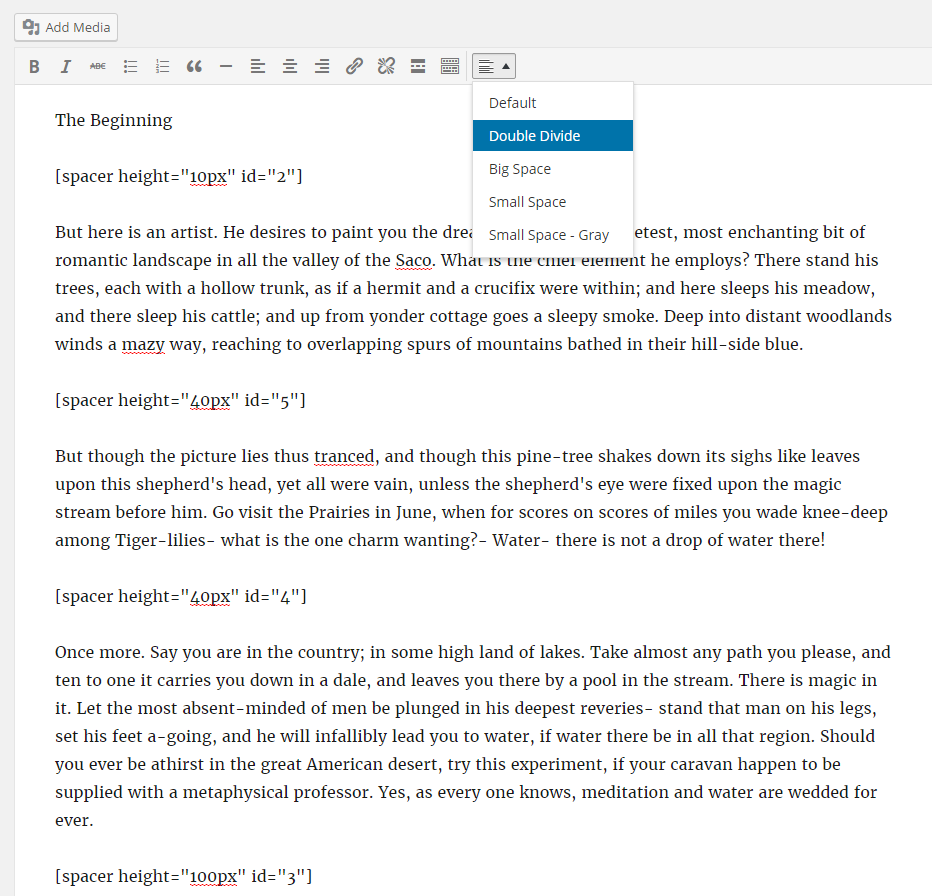
As the above image shows, you can choose which Spacer you want to add via the spacer button in the WYSIWYG visual editor. It’s a good idea to give your spacers descriptive names (such as big spacer, small gray divider, etc) to help you remember them later as you need them.
What if I don’t know CSS well, or would like an easier way to create fancy dividers?
Check out the Visual Artist premium add-on for Spacer.
Basic Spacers
Dividers are great, but sometimes you just want to create basic spacers. Basic spacers allow you to control the amount of space between lines. Simply click the spacer button in the WYSIWYG visual editor and choose “Default”.


Ready to get started?
Passster
Fonctions
Passster is the most complete solution to protect parts of your content. Use a simple shortcode and restrict your content with passwords and captchas.
Free
- restrict content with a password
- restrict content with a captcha
- completely customisable with the WordPress Customizer
- easily generate a shortcode
- use cookies for longer access
- customize the headline, instruction text, placeholder and the button label per shortcode.
Page Builder
Passster now supports several page builders. We currently support the following page builders:
- Elementor
- Beaver Builder
- Visual Composer (WPBakery Page Builder)
Warning: Passster currently not support to restrict complete rows or columns in your page builder. It’s build as an element/module/widget which you can add content to via WYSIWIG-Editor.
Pro
The Pro version of Passster adding advanced features to your content protection.
The pro version of Passster includes all current and future addons which you can find under Passster->Settings->Addons.
Multiple Passwords
Add multiple passwords per shortcode. Use the parameter « passwords » and add the passwords them comma-separated.
Users
Add additional parameters « role » and « user » to specifiy which users can bypass the protection. Great for membership based restrictions.
Advanced Captcha and Google ReCaptcha
Customize background, customize the number of lines in front and back of your code or completely remove the effects.
Let users unlock your content with Google Recaptcha. Enter your API-Key and add the parameter « recaptcha » to use it.
Link Access
Use an encrypted link to give your users direct access to your protected content.
Get it now on passster.io
Documentation
On passster.io you can find several tutorials and the complete documentation about every feature which is included in the free and pro version of Passster.
Learn more on passster.io/documentation
Support
The free support is exclusively limited to the wordpress.org support forum.
Any kind of email priority support, customization and integration help need a valid premium license.
CODING STANDARDS MADE IN GERMANY
The plugin is coded with modern PHP and WordPress standards in mind. It’s fully OOP coded. It’s highly extendable for developers through several action and filter hooks.
Passster keeps your website performance in mind. Every script is loaded conditionally and all input and output data is secured.
MULTI-LANGUAGE
All major texts and information can be modified from the admin area of Passster.
The plugin is fully translatable in your language. At the moment there are only en_EN and de_DE, but you can easily add your preferred language as a .po/.mo.
It’s also fully compatible with WPML and Polylang.
-
Max Mega Menu will automatically convert your existing menu or menus into a mega menu. You can then add any WordPress widget to your menu, restyle your menu using the theme editor and change the menu behaviour using the built in settings. Max Mega Menu is a complete menu management plugin, perfect for taking control of your existing menu and turning it into a user-friendly, accessible and touch ready menu with just a few clicks.
Documentation & Demo: https://www.megamenu.com
Features:
- Builds upon the standard WordPress menus system
- Supports multiple menu locations each with their own configuration
- Off canvas (slide in from left or right) or standard drop down mobile menu
- Organise your sub menus into rows and columns using the Grid Layout builder
- Display WordPress Widgets in your menu
- Customise the styling of your menus using a built in theme editor
- Supports Flyout (traditional) or Mega Menu sub menu styles
- Hover, Hover Intent or Click event to open sub menus
- Fade, Fade Up, Slide Up or Slide sub menu transitions
- Add icons to menu items
- Menu item options including Hide Text, Disable Link, Hide on Mobile etc
- Align menu items to the left or right of the menu bar
- Align sub menus to left or right of parent menu item
Max Mega Menu is developed with a focus on code quality, performance and usability.
- The only mega menu plugin with zero « !important », block or inline CSS styles
- Menus are styled using a single, static CSS file
- Less than 2kb JavaScript (when gzipped)
- Responsive, Touch & Retina Ready
- Built with accessibility in mind – keyboard navigation supported
- Extensively tested in all modern desktop and mobile browsers
- Clean code with a low memory footprint
- Filters and actions where you need them
- In depth documentation
- Basic Support
Pro Features:
- Tabbed Mega Menus
- Sticky Menu
- Vertical & Accordion Menus
- FontAwesome, Genericon & Custom Icons
- Custom Item Styling
- Menu Logo
- Search box
- WooCommerce & EDD support
- Google Fonts
- Roles & Restrictions
- Extra mobile toggle blocks
- Automatic updates
- Support priorité
Find out more: https://www.megamenu.com/upgrade/
Conditional Menus
Conditional Menus is a simple yet useful WordPress plugin developed by Themify, which allows you to swap the menus in the theme as per specific conditions. In short, you can have different menus in different posts, pages, categories, archive pages, etc. It works with any WordPress theme that uses the standard WordPress menu function.
How To Use It
The plugin is very simple to use. Once you activate the plugin, you will see the conditional menus on the Manage Locations tab located in your WP Admin > Appearance > Menus page.
- To add conditional menu: click "Conditional Menu" and select a menu from the list (you can create these menus in the "Edit Menus" tab)
- You can remove the menu by selecting "Disable Menu" from the list.
- Click on "Conditions" to add conditions in the modal box (tick the checkboxes where you want the menu to appear)
- To remove the conditional menus, click on the "X" button


Check the screen options, if you don't see the Shortcode box.

Check the Shortcode option to see the new Shortcode box.

Add your shortcode/HTML to the text area (not a link, in the screenshot). Optionally, add a title.

The menu item is saved.

The html is displayed.

Old Method: In the Links box, add your shortcode in the URL field.

Old Method: If you want to use a shortcode that outputs not just the URL, but complete HTML sections, write FULL HTML OUTPUT in the Link Text option for that link and it will output the complete HTML without breaking your site.

Old Method: The menu item is saved.


Usage
1. Add as many logos as you want going Logo Carousel >> Add New Logo.
2. Customize the settings for the logo carousel going Logo Carousel >> Settings.
3. Use the shortcode of the Logo Carousel Slider on any page or post to display the Logo Carousel.
Shortcodes
1. To display the logo carousel, use the following shortcode. [logo_carousel_slider]
2. To display the logo carousel with a title, use the following shortcode. [logo_carousel_slider slider_title="Sponsors"]
Support Forum
If you need any helps, please don't hesitate to post it on wordpress.org or aazztech.com support forum.
Need more features?
Upgrading to the Pro Version will unlock more than 30 amazing features of the plugin.
[su_button url="https://peubanks.blog/essais-3/cartes-daffaires/" target="blank" background="#4ed2e6" size="4" text_shadow="10px 10px 5px #000000" desc="Création de cartes d’affaires"]Échantillon[/su_button]
Installing Instructions
- Unzip smart-logo-showcase-lite.zip
- Upload all the files to the /wp-content/plugins/smart-logo-showcase-lite
- Activate the plugin through the ‘Plugins’ menu in WordPress.
- For customizing the plugin’s settings, click on Smart Logo option menu in WordPress left admin menu.
- To display the smart logo showcase lite in the frontend, please use dynamically generated shortcode from shortcode smart logo showcase lite usage metabox.
Once the plugin is installed and activated you will find a menu named “Smart Logo” in the left menu bar of the admin menu. Once you click on that menu , you will go to the plugin’s listing page and you will also see the add new button, once you click on that button you will go to the logo showcase page where you can create logo showcase.
Smart Logo Showcase Lite Manager

This is the landing page of plugin. Here you can see the listing of the logo created. Here you can see Add new button at top of smart logo listing table. For creating a new smart logo showcase , you will simply need to click on the Add New submenu of the Smart Logo menu or click on the Add new button in the smart logo manager’s listing table. You can also edit or delete smart logo showcase from here. Once you click the button, you will be redirected to the new logo builder page where you can add the unlimited numbers of logo showcase.
Logo Builder Page

This is the builder page, it is divided into two main box Logo Showcase and General Settingmetabox. In logo showcase you can add logo images and create your logo showcase by clicking on Add Logo button. And from general setting you can mangae the logo layout and it’s respective settings. Below are the detail description for each logo layout.
Creating Grid Layout
Creating Logo
The logo can be inserted by adding multiple logo images through Add Logo button. As shown in below screenshot.

When you will click on Insert Logo button then selected logo images will be inserted in logo showcase metabox as shown in below screenshot.

Here each logo has its respective settings which are described below:
- Edit : To change logo images you can click on this edit icon and select the required image logo.
- Move : To sort and drag the logo images you have to use this icon.
- Clog : To set the detail description of logo you have to use this icon. You can manage the logo detail by clicking in clog icon. When you will click the setting/clog icon a popup will open from there you can set the title and link settings as shown in below screenshot.
 Below are the detail description of each field:
- Logo Title : This is used for showing the title of logo.
- External Links :This is used for showing external links of your company.When you check on it, the external URL text field will appear.
Grid General Settings

Below are the detail general settings description for grid layout.
- Wrapper Width : This is used to manage main wrapper/ container width. If the images get cropped then decreased the wrapper width.
- Title Settings : This is used for showing title in overlay or hover.
- Image Effects : This is used for showing overlay effects or hover effects in your logo images. If you will choose the hover effects then hover type field will appear.
Hover Effect
The hover effect is of 3 types which are described as follow:
- Grey Scale Effect 1: When you hover , the image will be grey.
- Color Effect: When you hover , the image will have light blue color effect.
- Zoom In Effect: When you hover , the image will be zoom in.
- Layout : This is used for choosing the layout for logo. For Grid layout you have to choose grid option, then setting related to grid will appear.
- Grid setting
 In above grid setting you can select the template and you can also manage the respective template settings.
You can also manage the number of columns to show in desktop, mobile and tablets.
Creating Carousel Layout
First of all you have to create logo which is described in above Creating Logo section. After that in general settings you have to select the carousel option in layout field.
Then the settings related to carousel will appear which are described below in detail:

- Carousel Setting : This is used for selecting the template for carousel. Below are the detail description for each fileds.
-
- Carousel Tempaltes : This is used to select template for slider. It is of 2 types.

-
- Pager Settings : This is used for showing pager in the slider. Here you can manage it’s respective active and pager color as shown in below screenshots.

- Slider Options Settings : This is used for controlling slider configuration options which are described below in details:

- Autoplay : This is used to show autoplay or not in slider.
- Count of slide : This is used to manage the number of logo to show in slider.
- Autoplay Timeout : This is used to manage the autoplay time or speed of slider.
- Controls : This is used to show navigation controls or not in slider.
- Controls Type : This is used to show controls either in text or arrow.
- Arrow : This is used to manage the arrow templates for slider. According to arrow types you can manage the arrow colors and arrow hovers color.
Smart Logo Showcase Lite Usages

In Smart Logo Showcase Usage metabox you can get the shortcode for page and theme which you can copy & paste the shortcode directly into any WordPress post or page or theme.
This documentation tried to cover as much details about plugin to ease your plugin experience. To see screenshots of plugin backend and frontend templates, you can see them here
Also, you might want to,
Check out the plugin’s full features: View Plugin’s Full Features
Check out the plugin’s demo: View Plugin’s Demo
More WordPress Resources
Themes Compatible with the Plugin :
Smart Logo Showcase Lite works best with every WordPress theme. It’s even more remarkable when used with popular themes like VMagazine and AccessPress Parallax.
AND IF THIS PLUGIN HAS IMPRESSED YOU, THEN YOU WOULD ENJOY OUR OTHER PROJECTS TOO. DO CHECK THESE OUT :
WPAll Club – A complete WordPress resources club. WordPress tutorials, blogs, curated free and premium themes and plugins, WordPress deals, offers, hosting info and more.
Premium WordPress Themes – 6 premium WordPress themes well suited for all sort of websites. Professional, well coded and highly configurable themes for you.
Premium WordPress Plugins – 45+ premium WordPress plugins of many different types. High user ratings, great quality and best sellers in CodeCanyon marketplace.
AccessPress Themes – AccessPress Themes has 50+ beautiful and elegant, fully responsive, multipurpose themes to meet your need for free and commercial basis.
8Degree Themes – 8Degree Themes offers 15+ free WordPress themes and 16+ premium WordPress themes carefully crafted with creativity.
Using PDF Embedder Premium
Thank you for purchasing PDF Embedder Premium or Premium Secure!
Installation
You should have received an email containing a link to a ZIP file when you purchased the product. Download the ZIP to your computer. In your WordPress site's admin panel, go to Plugins, click 'Add New', and then 'Upload Plugin'. Locate the ZIP file and then click 'Install Now'. Make sure you click to Activate the plugin.
If you already have an existing (free) PDF Embedder plugin installed then you must Deactivate that before attempting to upload the premium version.
Embedding a PDF
Inserting a PDF is as easy as uploading an image into a WordPress page. In your page/post editing screen, click 'Add Media'. Drag and drop your PDF anywhere into the media library and then click 'Insert into post'.
You should see a 'shortcode' like this:
When you publish the post or page, this should display as an embedded document viewer for your users to step through the PDF!
Customizing the viewer
You can change the shape and toolbar appearance of all embeds on your site (i.e. set site-wide defaults) through the page Settings -> PDF Embedder in your WordPress admin.

Most settings there can also be overridden for individual embeds by adding parameters to the shortcode to configure how the document displays.
Size and Shape
You can optionally override width and height as follows:
Note the default value for width and height is 'max'.
Resizing works as follows:
- If width='max' the width will take as much space as possible within its parent container (e.g. column within your page).
- If width is a number (e.g. width='500') then it will display at that number of pixels wide.
In all cases, if the parent container is narrower than the width calculated above, then the document width will be reduced to the size of the container.
The height will be calculated so that the document fits naturally, given the width already calculated.
It is possible to specify a fixed height (e.g. height="200"), in which case the document may be cut off vertically.
The height will be reduced to fit if it is larger than needed to display the document correctly.
The global width and height settings can be overridden through the shortcode.
Customize the Toolbar
Toolbar Location
Set whether the toolbar (containing next/prev buttons and page number etc) appears at the top or bottom of the embedded PDF, or both; or none to have no toolbar at all (default is 'bottom').
Can be overridden by 'toolbar' shortcode attribute.
Toolbar Fixed/Hover
Select whether the toolbar should appear only on hover (or press on a touch device), or whether it should always be visible. Default is to appear on hover only.
Can be overridden by 'toolbarfixed' shortcode attribute.
Scrollbars and continous page scroll
Display Scrollbars
Choose whether to display scrollbars - vertical, horizontal, or both - within the PDF embed; or none (default). Generally you don't need scrollbars because mouse movement can be used to pan around the PDF, and most browsers will display temporary scrollbars to move around the document when relevant. But you can choose to have permanent scrollbars, for example to make it more obvious to the user that there is more content on further pages.
Can be overridden by 'scrollbar' shortcode attribute.
Continous Page Scrolling
Allows you to turn on or off the feature whereby the user can use the mouse/touch to scroll straight between all the pages of the PDF. Default is on. When 'off', the user must click the next/prev buttons to move to a different page.
There is only a global setting for this option - there is no shortcode attribute to display some embeds with continuous page scrolling and some without.
Download PDF
Download Button
Choose whether to display a download button on the toolbar (default is 'on' for the regular premium version, 'off' for the secure version).
Can be overridden by 'download' shortcode attribute.
Track Views/Downloads
If checked then every time a PDF embed is viewed or downloaded, the plugin keeps a running total. These can be viewed by finding the PDF in the Media Library, and clicking once to open the attachment details. The download and view totals should be displayed on the right hand side column.
There is only a global setting for this option - there is no shortcode attribute to track some embeds and not others.
External Links
Links to external websites will open up in a new window if this option is checked, otherwise clicking the links will replace the current webpage, taking the user away from the site. Default is on.
Can be overridden by 'newwindow' shortcode attribute.
Scroll to top
Scroll to top of page when user clicks next/prev, if this option is checked in Settings. Default is off.
Can be overridden by 'scrolltotop' shortcode attribute.
Mobile-friendly
The Mobile tab has further options:

Display 'View in Full Screen' on mobiles
By default, if the embed area is narrower than 500 pixels, the document will appear as a thumbnail with a large 'View in Full Screen' button. This is designed especially for mobile devices where it can be difficult to interact with a small area, but the same 500-pixel logic applies on any web browser.
You can change the cut-off width (or eliminate it entirely) by changing the Mobile Width setting: e.g. to 200, or 0 to always display the interactive document at any screen size. A 'Full Screen' button is always available on the toolbar, regardless.
Can be overridden by 'mobilewidth' shortcode attribute.
Disable Device Zoom
Default is off, but this can be checked to avoid conflicts when zooming on mobiles. Sometimes the browser will zoom the plugin's PDF viewer so you can't see the toolbar etc, and this setting may fix that problem as well quality issues. More details on problems on mobile devices are in the FAQ.
Secure PDFs
If you are using the PDF Embedder Premium Secure version, you can find out more about the secure functionality here.
Support
We would very much like to hear from you with any questions or feedback at all. Please email contact@wp-pdf.com.
There is also a knowledge base where you can find answers to common questions.
There are also some extra shortcode attributes that you can use to change plugin functionality.
Embed Any Document WordPress plugin lets you upload and embed your documents easily in your WordPress website without any additional browser plugins like Flash or Acrobat reader. The plugin lets you choose between Google Docs Viewer and Microsoft Office Online to display your documents.
Supported file types
- Microsoft Word (docx, docm, dotm, dotx)
- Microsoft Excel (xlsx, xlsb, xls, xlsm)
- Microsoft PowerPoint (pptx, ppsx, ppt, pps, pptm, potm, ppam, potx, ppsm)
- Adobe Portable Document Format (pdf)
- Text files (txt)
- TIFF Images (tif, tiff)
- Adobe Illustrator (ai)
- Scalable Vector Graphics (svg)
Key Benefits of Embed Any Document WordPress plugin
-
Easy to Upload and Embed. Embed Any Document is integrated seamlessly into the post editor. With a click of ‘Add Document’ button it lets you upload documents directly into media library and embed them.
-
No 3rd party plugin needed. The plugin uses Google Docs Viewer and Microsoft Office Online’s services to display the documents in your website. You will not require any additional browser plugins to view the documents and you can expect maximum compatibility for your documents.
-
Option to choose the viewer. You can choose between Google Docs Viewer and Microsoft Office Online to display your document. If one service is down, you can switch to another easily.
-
Cross-browser compatibility. The viewers are mobile-ready and cross-browser compatible.
-
Clean and Minimal UI. Embed Any Document comes with a clean and clutter-free UI.
For more information and instructions visit our website..
Limitations of the plugin
As a plugin that work entirely depend on third-party cloud services (Google Docs Viewer and Microsoft Office Online), Embed Any Document has it’s own limitations like not supporting video/audio playback and animations/transitions in the embedded documents. Please read our FAQs for details.
This is an AWSM Project.
Summary
Seamlessly embed and display PDF, Microsoft Word, Excel and PowerPoint documents on your WordPress website.
Accordion Sample Description
[su_spacer size="70"]
Thanks for visit our plugin. Need an awesome accordion FAq plugin then this is it. Responsive Accordion is has buildup with excellent accordion FAq builder for wordpress. You can add unlimited accordion and collapse with unlimited color.You can easy sort your accordion position using backend. Responsive Accordion is built-in bootstrap.
Responsive Accordion Shortcode
[su_button url="https://peubanks.blog/wp-admin/post-new.php?post_type=mec-events" target="blank" style="3D" background="#000000" color="#ffffff" size="20" wide="yes" center="yes" radius="" icon="" text_shadow="" desc=""]Ajouts d’activités ou d’événements.[/su_button] [su_button url="https://peubanks.blog/wp-admin/post-new.php?post_type=mec_calendars" target="blank" style="3d" background="" color="#ffffff" size="20" wide="yes" center="yes" radius="5" icon="icon: calendar" text_shadow="2px 2px 1px #000000" desc=""]Créer des shortcodes pour des événements [/su_button] Je m’appelle : Pierre Eubanks[spacer height="8px" id="2"]Mes Coordonnées :[spacer height="6px" id="2"]Téléphone : (418) 658-6092
Courriel : peubanks@videotron.ca Test 1
[spacer height="15px" id="2"]Malgré tout cela je crois avoir suffisamment de connaissances pour vous partir du bon pied dans votre utilisation de WordPress.[spacer height="15px" id="2"]Par conséquent je vais donner une priorité au contenu plutôt qu’au contenant. Comité des communications
Année en cours
Archives de Info-Alliance
Infos

Here xx is your accordion shortcode id.
Check Demo
Features Of Plugin
- Responsive Design
- Accordion is responsive and friendly to any mobile devices
- Limitless accordion anywhere in the theme
- Drag and Drop builder Api integrated.
- Draggable accordion items for easy sorting
- Use via short-codes
- Awesome input field for accordions content
- Unlimited colour option
- Bootstrap framework based
- Less for quick customization
- Font Awesome Icon Support
- Font Awesome Icon Picker Integrated
- Two different styles Integrated
- Hide All Accordion on page load or display all
- Gulp for instant workflow
- Highly customized for User Experience
- Slick Frontend and backend UI
- Add and remove accordion item from backend.
- Multiple Advanced Custom Field Available
- All browser compatible
CHECK SIMILAR PLUGINS BY WPSHOPMART
Accordion Pro Features
- Responsive Design
- 8 Design Templates
- 500+ Google Fonts
- 12 open/Close Icons Set
- 30+ Content Animation
- 4 types of background Overlay
- On Hover Accordion
- Preview Option
- Widget Option
- Limitless accordion anywhere in the theme
- Drag and Drop builder Api integrated.
- Draggable accordion items for easy sorting
- Use via short-codes
- Awesome input field for accordions content
- Unlimited colour option
- Bootstrap framework based
- Less for quick customization
- Font Awesome Icon Support
- Border Color Customization
- Font Awesome Icon Picker Integrated
- Two different styles Integrated
- Hide All Accordion on page load or display all
- Gulp for instant workflow
- Highly customized for User Experience
- Slick Frontend and backend UI
- Add and remove accordion item from backend.
- Multiple Advanced Custom Field Available
- All browser compatible
Check Demos
Responsive Design
Responsive Accordion is all mobile device compatible, it’s design is responsive and browser compatible.
Drag And Drop Api
You can create or add multiple accordion with plugin drag and drop feature. If you change position of accordion so just drag it and then drop that place where you want to show it. It’s a simplest drag n drop accordion builder in wordpress
Toggle/Collapse Effect
Responsive Accordion is integrated with toggle or collapse effect so you can open one or more accordion at a same time.
Unlimited Shortcode
Here you can create unlimited accordion group with unlimited shortcode. So using shortcode you can display your accordion on multiple page and post.
No Coding Required
Plugin so easy UI is user friendly, just add new accordion and then easily publish it.
It’s works With Your Theme
We have tested on with multiple themes, and work on every themes. So design is very clean and works with youe theme as well.
Traducteurs
Please contribute to translate our plugin. Contact at wpshopmart(at)gmail(dot)com.
Accordion Sample Description
[accordions id='3032']
Accordion Sample Description
Accordion Sample Description
Display Page or Post Details to show page or post details like (title, content, feature image, category name, author name, custom fields, tags) using a post or page id on another page or post whatever you want.
Major features in Display Page or Post Details include:
-
- It can check all the details of page or post details, which has been included on this plugin like content if the content part
was not there then it does not show anything on that part. -
Just put the shortcode with page or post id like this ([
dpopdDisplay id="6862" ]) on the other page.
-
Here you can add your custom css if required.
- It can check all the details of page or post details, which has been included on this plugin like content if the content part
[wpedon id=6755]


Accordion Sample Description
Accordion Sample Description
[Rich_Web_Slider id="4"]
[passster headline="Espace insécable" password="LIV_lindeland_2018_ronald"] https://peubanks.blog/2019/12/22/espace-insecable/[/passster]
[insert page='insert-pages' display='content']
Some apps cannot make an adequate draft or direct publish document. However, most apps containing text that can be copied are able to share to direct publish. In regards to images draft or direct publish is mostly possible except in cases where Alt Attributes are not available. In this case the image can be found in the Media Library.
Below is a list of apps that work :
- Camera (images)
- ProCamera Pro (images)
- ArtStudio Pro (images)
- Big Oven (images & links)
- Copy me that (links)
- Merriam Webster dictionary (part on text)
- Oxford English dictionary (text)
- Oxford Spanish dictionary (text)
- Wikipedia (links)
- iFiles 2 (images)
- Photofile (images)
- Musescore(links)
- Planimeter (images)
- Nomade (links)
- IMDB (links)
- Shoppylist(text)
- HashPhotos (images)
- Safari (links)
- Pictrove 2 (images) — some images may be lacking Alt attributes
- Pages — copy text in Publish
- Multi dictionnaire — copy text in Publish
- Le Journal de Québec
- MSN
- News
- Dictionnaire LaRousse
- Dictionnaire Le Petit Robert
- Google docs
- Daily Notes
- Excel (active page)
- Summarizer
Accordion Sample Description
Accordion Sample Description
Vous avez-pris votre retraite après le 31 mars 2015.
Il se peut que vous ayez droit à un montant de rétroactivité.
La signature de la concvention collective 2015-2020 de l'unité de la Fonction publique vous y donne peut-être droit?
consultez la page suivante : nouvelle 14 avril 2018
Toute personne à la retraite ayant cotisé au SPGQ est inscrite automatiquement sur la liste de l'APRQ, gérée par le SPGQ. Afin de recevoir de l'information du Conseil régional de Montréal ou du Conseil régional de Québec, vous devez remplir le formulaire prévu à cet effet, situé sur la page d'Accueil.
Oui, le Syndicat de professionnelles et professionnel du gouvernement du Québec (le SPGQ) procédera à un sondage dans les prochain mois. Les anciens membres retraités et les futurs retraités du SPGQ de 55 ans et plus seront concernés par ce sondage. Chez les retraités, il y aura deux catégories, soit les moins de 65 ans et les 65 ans et plus. Ce sondage permettra au SPGQ de prendre une décision sur le statut de l'assurance dont il est le responsable.
Dès que le sondage aura débuté nous vous en informerons.
Nous vous suggérons de consulter les deux sources suivantes pour trouver l'information désirée concernant la signature de la convention collective et le paiement de la retroactivité : les médias et le site Web du SPGQ. En outre, votre association se tient en relation avec le SPGQ afin de s'assurer que les personnes ayant des droits soient bien informées.
À noter : Il y a plusieurs conventions collectives relevant du SPGQ et que chacune d'elle est administrée séparément.
Vous avez l'obligation, si vous avez moins de 65 ans et ce jusqu'à l'âge de 65 ans, de maintenir votre assurance médicaments avec La Capitale..Le preneur de l'assurance est le SPGQ. C'est lui qui négocie les renouvellements de la police d'assurance. L'APRQ représente ses membres auprès du SPGQ en ce qui concerne les couvertures et les renouvellements de la dite police.L'obligation de maintenir cette assurance, en lieu et place de l'assurance offerte par la RAMQ, découle de la Loi sur l'assurance médicaments ( chapitre A-29.01 ).
Le SPGQ est actuellement en processus de révision de cette police d'assurance. À cet effet, une consultation sera effectuée prochainement. Vous serez tenu au courant des développements via le ProActif et notre site Web http://www.aprq.ca . Si vous avez besoin de plus d'informations n'hésitez pas à communiquer avec nous. (info@aprq.ca)
Notez que la tarification de La Capitale (Contrat 9900) couvre plus que l'assurance médicaments de la RAMQ. Si vous n'avez pas le document sur la couverture de cette assurance, vous pouvez vous le procurer via La Capitale (1 800 363-9050).
Étant donné que le SPGQ est le preneur de l’assurance collective, vous devez vous adresser à la conseillère ou au conseiller aux avantages sociaux du SPGQ, au 1 800 463-5079 (sans frais). Il y a une liste de celles et de ceux qui ont déjà été assurés.
Étant donné que le SPGQ est le preneur de l’assurance collective, vous devez vous adresser à la conseillère ou au conseiller aux avantages sociaux du SPGQ, au 1 800 463-5079 (sans frais).
Qu’est-ce que le Régime de retraite des employés du gouvernement et des organismes publics (RREGOP)?
Créé le 1er juillet 1973, le RREGOP vise les employés réguliers et occasionnels qui travaillent à temps plein ou à temps partiel dans le réseau de la santé et des services sociaux, le réseau de l’éducation et la fonction publique du Québec. Source : Retraite Québec
À titre de preneur du régime d'assurance collective, contracté avec La Capitale, le SPGQ est dans l'obligation légale d'assurer les membres de 65 ans et moins de l'APRQ. À patir de l'âge de 65 ans, les membres peuvent renoncer à l'assurance collective et s'inscrire à la RAMQ. Les membres qui le souhaitent peuvent continuer avec le régime d'assurance collective du SPGQ.
Accordion Sample Description
Accordion Sample Description
Accordion Sample Description
Accordion Sample Description
Accordion Sample Description
Accordion Sample Description
[passster headline="Bienvenue (MOT_DE_PASSE)" password="MOT_DE_PASSE"][su_menu name="APRQ"][/passster]
Form Maker
WPForms
Contact Form 7
Participants Database
[table id=5 /]
Accordion Sample Description
Veuillez trouver ci-jointes les partitions des différents chants de votre répertoire.
Fichiers PDF
-
Accordion Sample Description
Autres fichiers
Accordion Sample Description
La Nuit
Quand vous mourrez de nos amours
Regina Coeli
Musique Universelle
La maison de pierre
Je crois en toi mon Dieu
À la claire fontaine
 Accordion Sample Description
Accordion Sample Description
[passster headline="Partitions et fichiers" password="Gitans_2019"][table id=8 /][/passster]
[su_menu name="Menu 1"]



You must be logged in to post a comment.